HB100 Doppler Radar Module: A Guide to Radar Sensing
The HB100 Doppler radar module explained: 10.525GHz operation, output signal, amplifier design and practical motion detection tips for hobby projects.
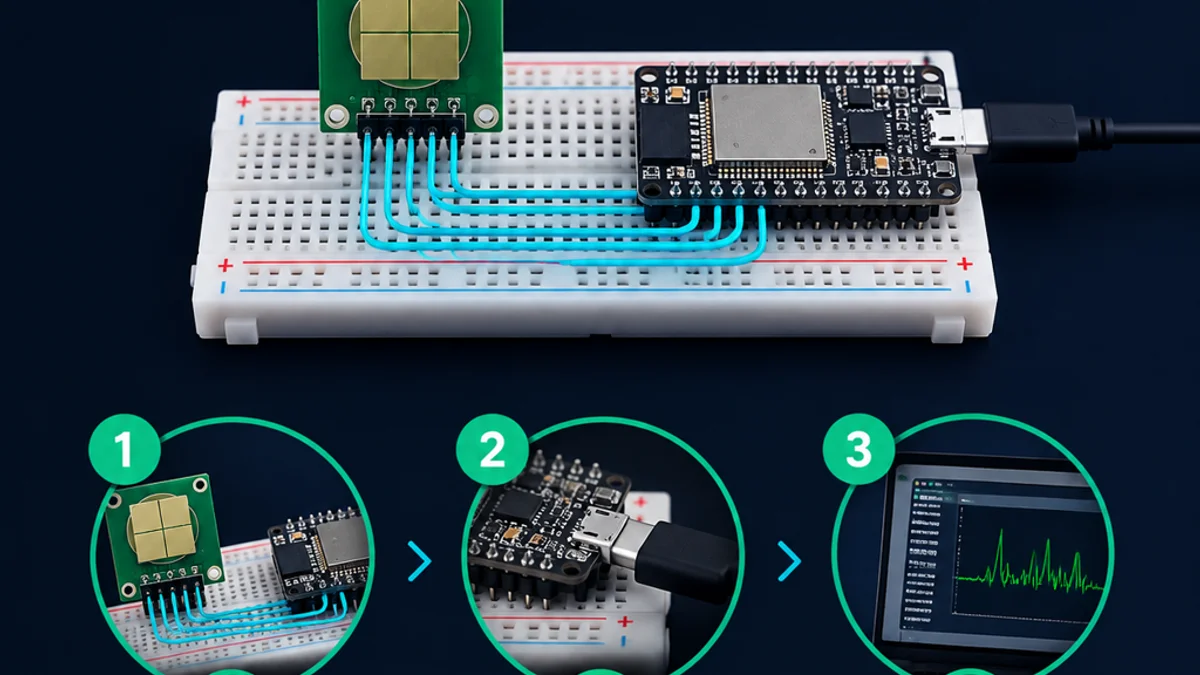
The HB100 Doppler radar module is a compact microwave motion-sensing board used by hobbyists, students, and engineers who want to experiment with practical radar technology. Instead of simply telling you that something is “nearby,” it detects movement by measuring Doppler shift, making it useful for motion detection, speed experiments, automation projects, and embedded sensing prototypes. This guide explains what the module does, how it works, where it fits, and what to watch for when designing with it.
What does the HB100 Doppler radar module actually do?
The HB100 Doppler radar module transmits a microwave signal, receives reflections from moving objects, and produces a low-frequency intermediate-frequency output related to motion. In plain language, it acts like a small radar front end: when a person, vehicle, fan blade, or other target moves toward or away from the module, the reflected signal changes slightly, and that change can be amplified and processed by external electronics.
The commonly referenced HB100 is an X-band Doppler transceiver module, often documented around a 10.525 GHz operating frequency and a 5 V supply, with an IF output intended for additional signal conditioning rather than direct plug-and-play digital reading. (theremino.com) That distinction matters. The module is not the same as a finished motion detector with a clean logic output. It is more like the radar “sensing engine” inside a larger circuit.
That makes it especially interesting for learning. A basic PIR sensor can tell you that warm-body motion has likely occurred, but a doppler radar sensor lets you explore signal strength, movement direction ambiguity, speed-related frequency, filtering, amplification, and the real-world messiness of reflected microwave energy.

A compact doorway into radar technology
Radar technology can feel intimidating because it often appears in aviation, weather systems, defense, autonomous vehicles, and industrial measurement. The HB100 makes the basic idea approachable. It shrinks a microwave transmitter, receiver, and antenna arrangement into a small module that can be connected to an amplifier and a microcontroller or measurement instrument.
The appeal is not that the HB100 does everything by itself. Its real value is that it exposes the core behavior of Doppler radar in a form that is affordable and physically manageable. When you move your hand in front of the sensor and observe a changing waveform, you are seeing a simplified version of the same physical principle used in much more advanced systems.
Because of that, the hb100 doppler radar module is popular in projects where the goal is not only detection, but also understanding. It rewards curiosity. You can start with a simple motion alarm, then gradually move into frequency measurement, analog filtering, microcontroller sampling, enclosure experiments, and field-of-view testing.
How Doppler sensing works
Doppler radar relies on a familiar physical effect: waves appear to change frequency when the source and observer move relative to one another. In sound, this is why a passing siren seems to shift pitch. In radar, the transmitted microwave signal reflects from a moving object and returns with a slight frequency shift.
Inside a Doppler module, the transmitted signal and the received reflection are mixed together. The result is a much lower-frequency signal that represents the difference between them. This lower-frequency result is the IF signal, and it is the part your external circuit can amplify, filter, measure, or interpret.
The HB100 documentation and many vendor descriptions identify it as a Doppler motion sensor module that uses this principle rather than time-of-flight distance measurement. (manuals.plus) That means it is best understood as a motion-sensitive radar front end, not as a direct distance sensor. If the target is stationary, the Doppler shift largely disappears, even if the object remains in front of the module.
Motion toward and away matters most
A Doppler radar sensor responds most clearly to radial movement: motion toward the module or away from it. If a target moves perfectly sideways across the field, the radial component may be smaller, so the output can be weaker or harder to interpret. In real rooms and outdoor environments, reflections often make the behavior less perfect, but the principle still guides placement.
This is one reason mounting angle matters. If you want to detect someone walking down a hallway, aiming the module along the expected walking path can produce a stronger signal than mounting it perpendicular to that path. If you are experimenting with vehicle speed, fan speed, or object motion on a track, alignment becomes even more important.
The output is information, not a finished answer
The IF output from the HB100 is typically small and analog. It needs gain, noise control, and signal interpretation before it becomes useful to a microcontroller. A beginner mistake is to connect the IF pin directly to a digital input and expect a stable high-or-low result. That usually misses the point of the module.
A better approach is to treat the IF signal as raw measurement data. With an amplifier, you can observe it on an oscilloscope. With filtering and thresholding, you can build a motion trigger. With frequency analysis, you can estimate speed under controlled conditions.
Why is the IF output so important?
The IF output is important because it carries the motion-related signal produced when the transmitted microwave energy mixes with its Doppler-shifted reflection. It is the bridge between the microwave side of the module, which most project builders do not directly handle, and the low-frequency electronics that can be amplified, filtered, sampled, and analyzed.
Think of the HB100 as two parts working together. The module handles the high-frequency microwave job. Your circuit handles the low-frequency interpretation job. This division is what makes the module approachable, but it also means your surrounding electronics strongly affect the final result.
A useful signal chain often includes:
- A clean 5 V power supply with good local decoupling.
- A low-noise amplifier stage for the small IF signal.
- A filter that keeps the motion frequencies of interest and reduces unwanted noise.
- A comparator, ADC, or audio-style processing path, depending on the project.
- Software logic that decides what counts as valid movement.
For a simple motion detector, the software might only need to recognize that the signal crossed a threshold for a short period. For a speed experiment, the software needs to estimate the dominant frequency in the IF signal. For a more polished product-style prototype, it may need to reject false triggers caused by vibration, power noise, or background motion.
Common ways to use the HB100
The hb100 doppler radar module can support many projects, but it works best when the project is designed around motion rather than presence. It is not ideal for identifying exactly what an object is or how far away it is. It is better for answering questions such as “is something moving?” or “how fast is a target moving toward or away from the sensor?”
Popular use cases include:
- Motion-activated lighting: Detecting movement in a hallway, garage, entryway, or workbench area.
- Security experiments: Building a simple movement alarm or perimeter detector.
- Speed demonstrations: Measuring approximate speed from Doppler frequency in a controlled setup.
- Robotics: Giving a robot another way to notice moving objects beyond ultrasonic or infrared sensing.
- Industrial-style prototypes: Detecting motion through some non-metallic covers or in dusty environments where optical sensing may struggle.
- Educational labs: Demonstrating radar technology, signal mixing, Doppler shift, analog filtering, and microcontroller signal processing.
These applications sound broad, but they share the same design pattern. The sensor produces a motion-related signal, and the rest of the system decides what that signal means in context.

The strengths that make it useful
The HB100 remains interesting because it occupies a practical middle ground. It is more sophisticated than a basic switch-like detector, but simpler than a full radar development platform. That balance makes it a strong learning tool and a flexible prototyping component.
One major advantage is that microwave sensing does not depend on visible light. Darkness, glare, and normal lighting changes are not the main concern. This can be useful in enclosures, night operation, and situations where optical sensors become unreliable.
Another advantage is sensitivity to movement through certain materials. Depending on the material, thickness, mounting, and environment, microwave sensing may work behind plastic covers or other non-metallic barriers. This allows cleaner product-style designs where the sensor does not need a visible lens or opening. However, this should always be tested in the final enclosure because materials and geometry can change performance.
The module also encourages deeper signal processing. With PIR sensors, the internal circuitry often hides the analog behavior. With the HB100, the analog signal is part of the learning experience. That makes it valuable for anyone trying to understand not only “sensors,” but also the chain from physics to electronics to software decisions.
The limitations are part of the design
The HB100 is useful, but it is not magic. Its limitations are not flaws so much as consequences of how Doppler radar works and how minimal the module is.
First, it detects motion more naturally than still presence. If someone walks into an area and then stands completely still, the Doppler signal may fade because the relative movement has stopped. If your application requires reliable occupancy detection, you may need additional sensing methods or software assumptions.
Second, the raw IF output needs conditioning. Amplifier quality, grounding, shielding, filtering, and power stability can make the difference between a clean experiment and a frustrating one. The module’s job is to provide the radar front end. It does not remove every analog design challenge.
Third, reflections can complicate interpretation. Microwave energy can bounce off walls, metal surfaces, equipment, and moving background objects. A fan, vibrating panel, swinging sign, or nearby machinery can produce signals that look like motion because, from the radar’s point of view, they are motion.
Finally, compliance and application context matter. Radar modules operate in regulated radio-frequency bands, and rules vary by region, product type, and deployment. For casual bench experimentation, builders often focus on circuit behavior, but finished products require careful attention to regulatory requirements, labeling, enclosure effects, and responsible operation.
HB100 compared with PIR and ultrasonic sensing
The HB100 is easiest to understand when compared with sensors many builders already know. A PIR sensor detects changes in infrared radiation, usually associated with warm bodies moving across its segmented field. An ultrasonic sensor sends sound pulses and measures echoes, often to estimate distance. A doppler radar sensor transmits microwave energy and responds to frequency shifts caused by movement.
Each approach has strengths. PIR modules are inexpensive, simple, and convenient for human motion detection in rooms. Ultrasonic sensors are useful when distance to a surface is the main measurement. Radar modules like the HB100 are compelling when motion detection is needed without relying on light or when the project benefits from Doppler frequency information.
A practical comparison looks like this:
- Choose PIR when you need simple human motion detection with minimal analog design.
- Choose ultrasonic when short-range distance measurement is the main goal.
- Choose HB100 when you want microwave motion sensing, speed-related experimentation, or a more hands-on signal-processing project.
- Combine sensors when reliability matters more than simplicity. For example, radar plus PIR can reduce uncertainty by giving the system two different views of the environment.
The important point is not that one sensor is universally better. The right choice depends on what you need to know. If the question is “did something warm move in the room?” PIR may be enough. If the question is “is something moving toward this point, and can I analyze the signal?” the HB100 becomes much more attractive.
Practical setup tips for better results
Working with the HB100 is much easier when you treat it as an analog sensor system rather than a digital module. Good setup habits reduce false triggers, unstable readings, and confusing waveforms.
Start with power. Use a stable supply, keep leads short where practical, and place decoupling capacitors close to the module and amplifier circuit. Microwave modules and high-gain IF amplifiers can both reveal weaknesses in a noisy supply.
Next, think about physical mounting. Keep the antenna side clear, avoid placing large metal objects directly in front of the module unless they are part of the experiment, and test the final angle before committing to a fixed enclosure. Small changes in position can alter the reflected signal significantly.
Then build the signal chain in stages. Do not connect everything at once and troubleshoot blindly. Confirm power first, then observe the IF signal if you have the equipment, then add amplification, then add filtering, and only after that add microcontroller logic.
A simple setup checklist:
- Confirm the module orientation and pinout before powering it.
- Use a clean 5 V supply consistent with the module documentation. (digikey.com)
- Add local decoupling near the module and amplifier.
- Keep the IF trace or wire away from noisy digital switching lines.
- Use an oscilloscope or audio-frequency measurement tool if available.
- Test with predictable motion, such as a hand moving toward and away at a steady pace.
- Adjust gain and thresholds only after the physical setup is stable.
- Record what changes when you alter distance, angle, target size, and environment.
These steps may sound basic, but they prevent many common mistakes. Most disappointing HB100 experiments come from expecting the module to behave like a finished digital sensor or from trying to solve mechanical, electrical, and software issues all at once.
Signal processing turns detection into meaning
The raw signal is only the beginning. Signal processing is what turns radar behavior into a useful decision. The right method depends on whether you want a simple trigger, a speed estimate, or a richer motion profile.
For a basic motion detector, amplification followed by a threshold may be enough. The system watches for signal amplitude above a chosen level and triggers an output for a defined time. This can work well for lights, alarms, and demonstrations, but it may be sensitive to noise if the threshold is too low.
For speed-related projects, frequency becomes more important than amplitude. The Doppler frequency is related to target velocity along the radar line of sight, so measuring the signal’s dominant frequency can provide an estimate under controlled conditions. In practice, target angle, reflections, signal quality, and calibration all affect accuracy.
Microcontrollers can process the signal in several ways:
- Count zero crossings after suitable amplification and filtering.
- Measure time between peaks for slow, clean signals.
- Sample the waveform with an ADC and estimate frequency in software.
- Use filtering to ignore motion outside the desired speed range.
- Combine amplitude and frequency rules to reduce false positives.
For many projects, simple is better. A stable analog front end with conservative software logic often outperforms an ambitious algorithm fed by a noisy signal.
What should beginners build first?
Beginners should start with a visible or audible motion indicator before attempting speed measurement or advanced filtering. A basic project that lights an LED, triggers a buzzer, or displays signal activity teaches the most important lessons: power stability, module placement, amplification, thresholding, and the difference between real motion and environmental noise.
A good first build is a motion activity monitor. Connect the module to a suitable IF amplifier circuit, feed the conditioned signal into a comparator or microcontroller ADC, and display activity with an LED or serial plot. Move your hand toward and away from the module, then compare that with sideways motion. This immediately shows how directional movement changes the signal.
Once that works, add controlled experiments. Try different distances. Test behind a plastic panel. Aim the module down a hallway, then across the hallway. Place a fan in the field and observe how rotating blades affect detection. These experiments reveal more than a polished final project because they make the sensor’s behavior visible.
After that, move to frequency measurement. Use a rotating object, a small moving cart, or another repeatable target. The goal is not instant laboratory-grade accuracy. The goal is to understand how Doppler frequency, signal strength, alignment, and filtering interact.
Project ideas that fit the module well
The HB100 is flexible enough for many builds, but some project types match its strengths especially well. The best projects give the module a clear view of expected motion and provide enough processing to ignore what does not matter.
Consider these ideas:
- Garage motion light: Mount the module where people or vehicles move toward the sensing area, then use software delay to keep the light on after motion stops.
- Desk presence experiment: Detect small movements near a workstation, while learning why still presence is harder than motion.
- Mini speed demo: Use a repeatable moving target and measure the IF frequency to estimate relative speed.
- Robot motion awareness: Add radar as a companion to bumper, ultrasonic, or infrared sensors.
- Hidden sensor prototype: Test operation behind a plastic front panel for a cleaner enclosure design.
- Signal visualization tool: Plot the amplified IF waveform on a screen so users can see how movement changes the signal.
Each idea can be built in a simple version first and refined later. That is one of the module’s strengths: it supports incremental learning. You do not have to design a perfect radar system on day one.
Design habits that separate prototypes from reliable systems
A working bench demo is not the same as a reliable installation. To move from one to the other, you need repeatable testing and clear design rules. Radar technology is sensitive to environment, and the HB100 gives you enough raw access that your design decisions matter.
Document the test environment. Note the mounting height, angle, supply voltage, amplifier gain, filter settings, enclosure material, and nearby moving objects. If performance changes later, these notes help you find the cause.
Design for false positives. Ask what else can move in the field: curtains, fans, pets, doors, machinery, rain, or vibration. Then decide whether to solve the issue with placement, shielding, filtering, software timing, or sensor fusion.
Avoid relying on one perfect threshold. Real environments drift. A threshold that works on a quiet bench may fail in a garage, hallway, or workshop. Build in margin, use timing rules, and test with both desired motion and likely disturbances.
Finally, respect the analog front end. Good grounding, short signal paths, appropriate gain, and careful filtering are not optional details. With the HB100, they are central to performance.
The takeaway
The HB100 Doppler radar module is a small but revealing entry point into practical radar technology. It gives builders access to microwave motion sensing without requiring them to design the RF section from scratch, while still leaving enough signal-processing work to make the project educational and customizable.
Use it when you want to detect motion, explore Doppler behavior, or build a prototype that benefits from a radar-style view of movement. Pair it with a clean power supply, a thoughtful amplifier, sensible filtering, and careful placement. If you treat the HB100 as a radar front end rather than a finished digital switch, it becomes far more than a module — it becomes a hands-on lesson in how sensing systems really work.
Not sure which sensor fits your project?
Talk to our mmWave application engineers for a free consultation.
Specify your hotel project with our engineers
Send your room count, ceiling type, and protocol preference. We will return a sample plan and quote within 24 business hours.
- Move from general guidance into a product or application discussion.
- Use RFQ when pricing, drawings, MOQ, or launch timing needs structure.
- Keep a direct contact path visible for fast clarifications and handoff.